


 Most Popular
 What's New
Fake GPS Pokemon GO on Android & iOS (Safe and Free)

Free Pokemon GO Fake GPS App
Fake Pokemon GO GPS on iOS and Android. Teleport in Pokemon GO with 1 click. 100% safe and no modded game. Enjoy catching Pokemon remotely without leaving home!

Do you have similar trouble: living in an area that limits the Pokemon species you can catch, or can't find new Gyms and PokeStops? This situation makes the game less fun. Thankfully, there's an easy and quick solution: use the Pokemon GO fake GPS to change location.
To do this, you will need a Pokemon GO fake GPS app like LocaChange to modify your location. In this blog, I'll give a clear guide on the most effective and safest methods to fake GPS on Pokemon GO in 2026, working for both Android and iPhone. Let's begin.
In this article:
What Is Fake GPS Pokemon GO?
Pokemon GO fake GPS is a technical method to cheat in Pokemon GO and makes the game think you are in a different location.
Typically, you need to use a location spoofing tool to simulate your location and change GPS settings. One of the best fake GPS apps is LocaChange, which is safe, simple and compatible with all platforms while keeping your Pokemon GO account safe and secure.
Benefits of Pokemon GO Fake GPS
When you don't want to move around constantly, faking GPS is an easy and convenient solution. By changing your GPS location, you can virtually travel in the Pokemon world without physically moving anymore, easily collecting rare items like Sinnoh Stone.

Faking GPS location makes it easier to catch far and rare Pokemon that is usually inaccessible. This is especially beneficial for trainers living in densely populated or congested areas. Likewise, you can also easily find more Gyms, PokeStops and PvP battles.

If you have children who play Pokemon GO and concern about the safety when playing outside, you can consider GPS spoofing in Pokemon GO. This can ensure a safer gameplay situation for them.
Best Fake GPS Apps Pokemon GO Android & iOS 2026
1 LocaChange Fake GPS (iOS & Android)
The location changer LocaChange is the best app for fake GPS Pokemon GO. Whether you are an iOS or Android user, you can use this tool to simulate GPS signal and change your location in Pokemon GO to anywhere in the world instantly.
Besides GPS faking feature, LocaChange also has abundant game-related functions and modes, such as built-in Pokemon GO map, PvP finder, Poke scanner and so on. Most importantly, LocaChange spoofer is 100% safe and secure to use, and is undetectable.

 Key Features of LocaChange
- Fake GPS in Pokemon GO anywhere without restrictions.
- 100% safe to use. No need to download cracked or modded Pokemon GO. Spoof in official game version.
- It supports the latest iOS and Android systems.
- The best Pokemon GO joystick to teleport anywhere with 1 click.
- Adjustable moving speed. Auto cooldown timer.
- LocaChange has built-in Pokemon Scanner, PokeStop map, PvP finder, ect.
- Everyone can try it for free before choosing your plan.

New Release: Use Pokemon GO fake GPS without cracked game!
With the new feature, select the Bluetooth Connection, you can safely spoof in official Pokemon GO game. No third-party app, no modded game and 100% secure!

Steps to use LocaChange fake GPS Pokemon GO:
Step 1: Download and intall LocaChange on your mobile phone.
Step 2: On LocaChange, choose the Special Game Mode and open Pokemon GO to fake your GPS.

You can also to use LocaChange via PC to change location on iOS & Android:
Step 1: Connect your mobile phone to a PC.
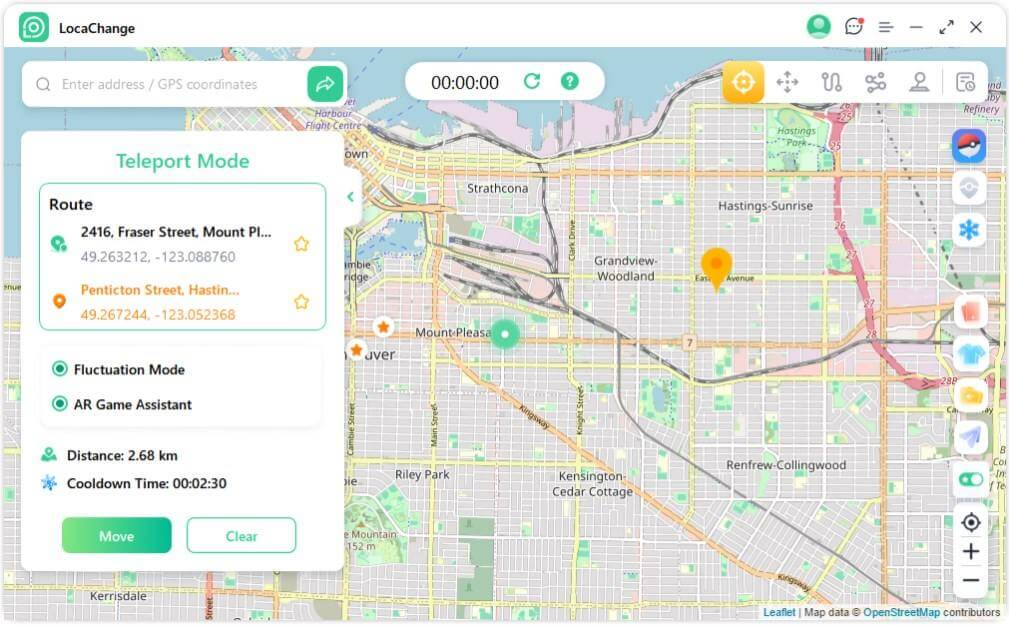
Step 2: Choose a mode you need and enter the location you want to change. Then open Pokemon GO to enjoy the fake GPS fun! How to fake GPS in Pokemon GO on Android? LocaChange can do that perfectly. In addition, another good choice is to use the free Android app Fake GPS Go. Fake GPS Go is a tool to simulate your Android location and custom routes anywhere in the world to move in Pokemon GO without walking. If you simply want a convenient way to use fake GPS, it will perfectly meet your needs. However, unlike LocaChange, it doesn't have any features specifically designed for Pokemon GO, and it lacks an automatic cooldown timer. You may need to refer to the cooldown chart yourself to avoid triggering a soft ban. Steps to use Fake GPS Go for Pokemon GO: Step 1: Download and install the mock location app - Fake GPS Go from Google Play. Step 2: Go to Settings > About Phone, tap Build Number 7 times until Developer Options unlock. Open Developer Options, find Select mock location app, and choose Fake GPS Go. Step 3: Open Fake GPS Go, move the map to the place you want, and tap Start. Now launch Pokemon GO. Your character should appear in the new location you picked. PGSharp is another popular fake GPS app for Android. It lets you change your Pokemon GO location easily and offers many extra features made specially for Pokemon GO players. This app includes tools like joystick movement, auto-walk, and quick teleport. However, PGSharp is not available on Google Play, so you need to download it from its official website. If you want a fake GPS tool with more built-in Pokemon GO features, PGSharp can be a good choice. But keep in mind that some advanced features require a paid plan. Steps to use fake GPS app PGSharp for Pokemon GO: Step 1: Go to the PGSharp official website and download the APK file. Install it on your Android phone. Step 2: Open PGSharp and log in with your Pokemon GO account. Step 3: Use the joystick or map inside PGSharp to pick your location. Then start Pokemon GO. Your character will appear in the new place you selected. Pokemon GO fake GPS brings players much convenience and makes the game more fun, however, it also brings risks. You need to know these risks first to use it properly and avoid being banned by Niantic.
For the firt time when Pokemon GO fake GPS is detected by the game, you will get a "Shadown ban" warning. You can only catch common Pokemon in the next 7 days.
For the second time, your account will be suspended for 30 days and you can't log in to your account.
If you caontinue to use Pokemon GO fake GPS, it is poosible to get a permenant soft ban. This is why you need to choose and use fake GPS for Pokemon GO wisely.
Yes, you can still use fake GPS tools for Pokemon GO. But you must spoof carefully. If you move too fast or teleport too often, your account may get a soft ban. To fake GPS, install a location changer app like LocaChange, Fake GPS Go, or PGSharp. Set your new location in the app, then open Pokemon GO. Your character will appear in the new place. Yes. Many fake GPS apps work, but their stability and features are different. Some apps only change your location, while others offer joysticks, routes, and cooldown tips. Pokemon GO can detect whether you are using fake GPS via cracked or modded games, because PoGo is able to read your files and detecte fused location if you use the tweak method. However, unlike other faking GPS apps, LocaChange change your GPS based on the Bluetooth Connection, and this method is undetectable, making your account much safer. The best fake GPS app for Pokemon GO is LocaChange. It is available on both Android and iOS platforms, and is very simple and friendly to use. More importantly, LocaChange can effectively protect your account and ensure that you won't be caught. Yes, LocaChange fake GPS has free trial on its PC version. You can download the software on Windows or Mac and try its location spoofing features for free. Other apps like Fake GPS Go and PGSharp offer free versions. But for more stable spoofing and better safety, paid tools usually work better. Pokemon GO is a widely popular game enjoyed by millions of players worldwide. Don't let your location hinder you from catching your favorite Pokemon. LocaChange is our highly recommended Pokemon GO fake GPS app. By using this fake GPS tool, a whole new world of possibilities will open up. You'll have access to virtual exploration of hundreds of new cities and streets. It's an opportunity worth trying.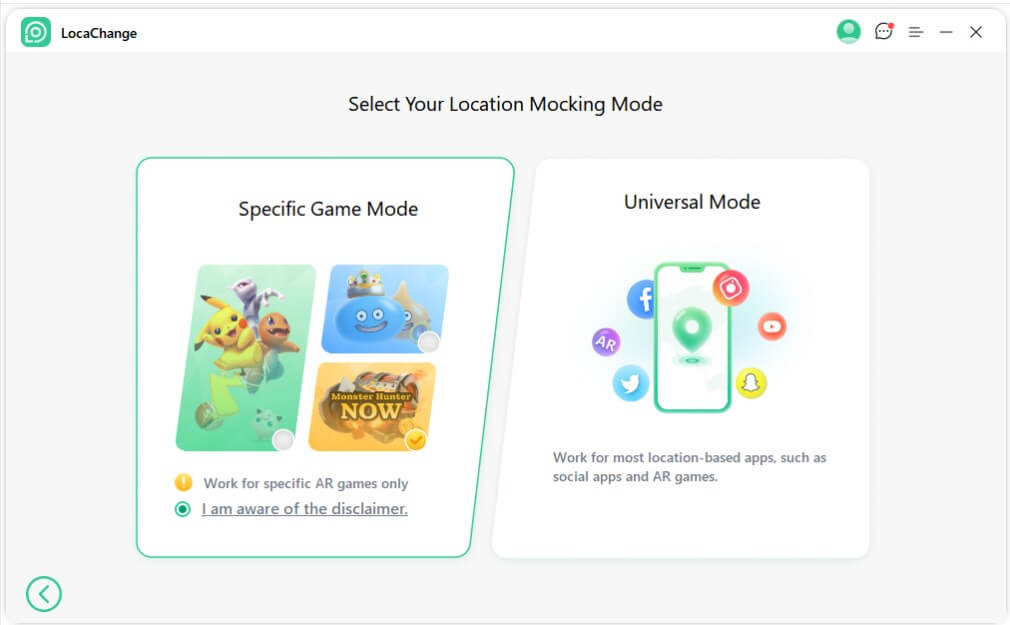
2 Fake GPS Go (Android)


3 PGSharp (Android)


Risks of Pokemon GO Fake GPS Hack

FAQs About Fake GPS Pokemon GO
1. Can you still use fake GPS on Pokemon GO?
2. How to fake GPS on Pokemon GO?
3. Do fake GPS apps work for Pokemon GO?
4. Can Pokemon GO detect fake GPS?
5. What's the best fake GPS for Pokemon GO?
6. Can I use Pokemon GO fake GPS for free?
Conclusion


 Related Articles
- Pokemon GO Quick Catch: How to Catch Pokemon in 5 Seconds
- [2026 Guide] How to Change Your Location in Pokemon GO (iOS & Android)
- [Full Guide] How to Use a Pokesniper to Catch Pokemon?
- [2026] iPogo Pokemon GO: Download, Use and Alternative
- [Free Guide] How to Play Pokemon GO on a PC or Mac?
- How to Spoof in Pokemon GO Without Getting Banned 2026?