


 Most Popular
 What's New
5 Best Monster Hunter Now Joysticks for iOS & Android

Monster Hunter Now Joystick
Use the best MH Now 360-degree joystick LocaChange to change your location in the game. Collect rare items and slay monsters easily!

If you want to unlock more weapons and builds in MH Now, you need to go far. This may be the most troublesome among hunters. A Monster Hunter Now joystick will be the best solution to save time.
In this article, we'll introduce the 5 best Monster Hunter Now joysticks for iOS and Android, you can explore the thrilling world of Monster Hunter right from the comfort of your own home. Let's see what they are.
In this article:
What Is a Monster Hunter Now Joystick?
A Monster Hunter Now joystick is a GPS spoofing tool that lets you move your in-game character without walking in real life. Instead of relying on your physical GPS signal, the joystick creates a virtual location and simulates walking, turning, or stopping - just like using a Nintendo-style controller on your screen.
Some advanced tools even include cooldown timers, natural walking simulation, and anti-detection features to keep your Monster Hunter Now spoofing safer and smoother.
Is It Safe to Use a MH Now GPS Joystick?
Using a Monster Hunter Now GPS joystick can be safe, but only if you use a trusted tool and follow anti-ban rules. Joystick spoofing is against Niantic's terms of service, so there is always some risk.
However, many players use GPS joysticks every day by keeping their movements natural and avoiding big teleports. Reliable joystick tools like LocaChange, or iTools BT help reduce issues like "Searching for GPS signal" or sudden location jumps.
Benefits of Using a Monster Hunter Now Mod APK Joystick
Using a Monster Hunter Now joystick mod APK or GPS joystick app gives you several advantages that make the game easier, especially if you cannot walk long distances. Here are the main benefits:
1. Explore More Regions Easily
With a MH Now joystick, you can choose any country, city, or even enter exact GPS coordinates. This helps you reach rare monster spawns, special habitats, and high-activity areas without traveling.
2. No More GPS Errors or VPN Problems
Many players try VPNs or unstable spoofing tools and face issues like "Monster Hunter Now Searching for GPS Signal." A joystick app provides a stable GPS feed, so your movement stays smooth while spoofing.
3. No Waiting for Respawns
Large monsters and key resources have reset timers. Using a joystick, you can move to another area instantly and continue hunting - no more waiting in the same spot for spawns.
4. Better Control and Faster Farming
A joystick lets you walk around monsters, stay in safe zones, and farm materials faster, which is extremely helpful for busy players.
5 Best Monster Hunter Now Joysticks for iOS and Android
| MH Now GPS Joystick | Platforms | Safety | Free Trial | Moving Mode | Rating |
|---|---|---|---|---|---|
| LocaChange | iOS & Android | 100% (No root / No ban reports) | Smooth joystick + routes |  |
|
| Fake GPS Location – GPS JoyStick | Android | Medium (easily detected if settings wrong) | Limited | Basic joystick | |
| iTools BT 2.5 | iOS (Hardware device) | Medium–High (physical dongle) | Hardware joystick | |
|
| Root Joystick (LSPosed / Magisk) | Android (root) | Low–Medium | Advanced joystick | |
|
| VMOS Virtual Joystick | Android | Medium | Virtual joystick | |
Joystick 1 LocaChange
LocaChange is one of the best location changer apps for Monster Hunter Now spoofing. It works on both iOS and Android, and lets you change your GPS location with 1 click. With the built-in Monster Hunter Now joystick, you can move freely in the game without any walking or restrictions.
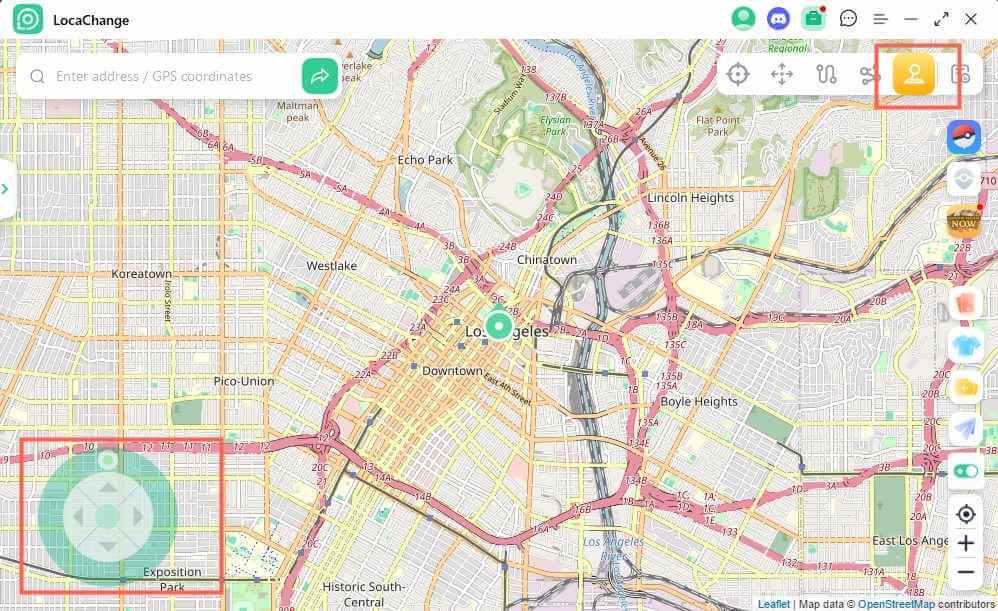
LocaChange offers a specially designed 360-degree joystick mode that lets you move automatically, adjust direction in real time, and explore the map just like using a Nintendo-style controller. No matter where you are in real life, LocaChange helps you hunt monsters anywhere in the world.

 Key Features of LocaChange
- The 360-degree joystick allows you to simulate smooth in-game movement as if you were using a Nintendo Switch.
- Perfect for farming materials, moving between hotspots, and testing different Monster Hunter Now weapons.
- Works on both iOS and Android, and supports up to 10 devices at the same time.
- Simulate GPS routes with custom speed and path.
- 100% safe to use - no ban, softban, or account suspension.
- Offers PC software and mobile app versions. You can change location directly on your phone or use a PC for more stability.
- Free trial available for all users.
How to Use the LocaChange Joystick for Monster Hunter Now:
Step 1 Download and install LocaChange on your Android and iOS.
Step 2 Open the LocaChange app > choose Specific Game > select Monster Hunter Now > start using the joystick and enjoy the game.
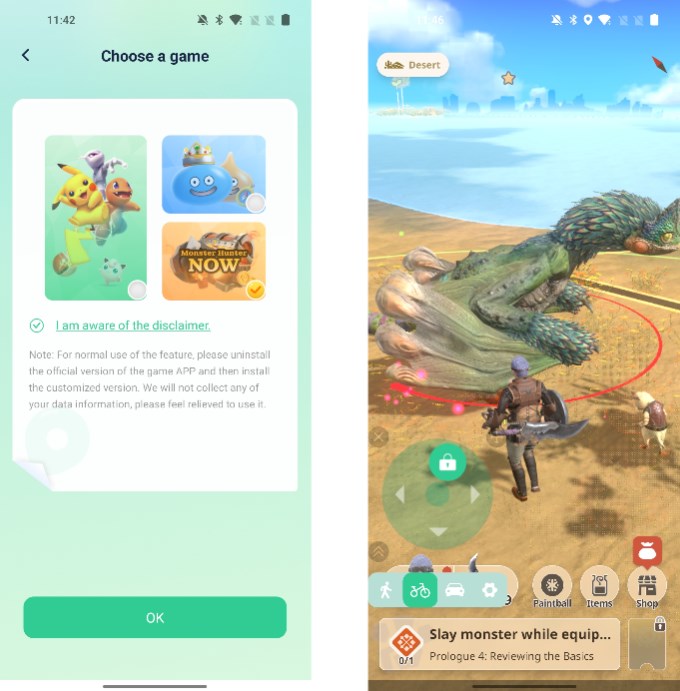
Use LocaChange Joystick on PC with 1 Click:
Step 1 Launch LocaChange PC and choose Game Mode.
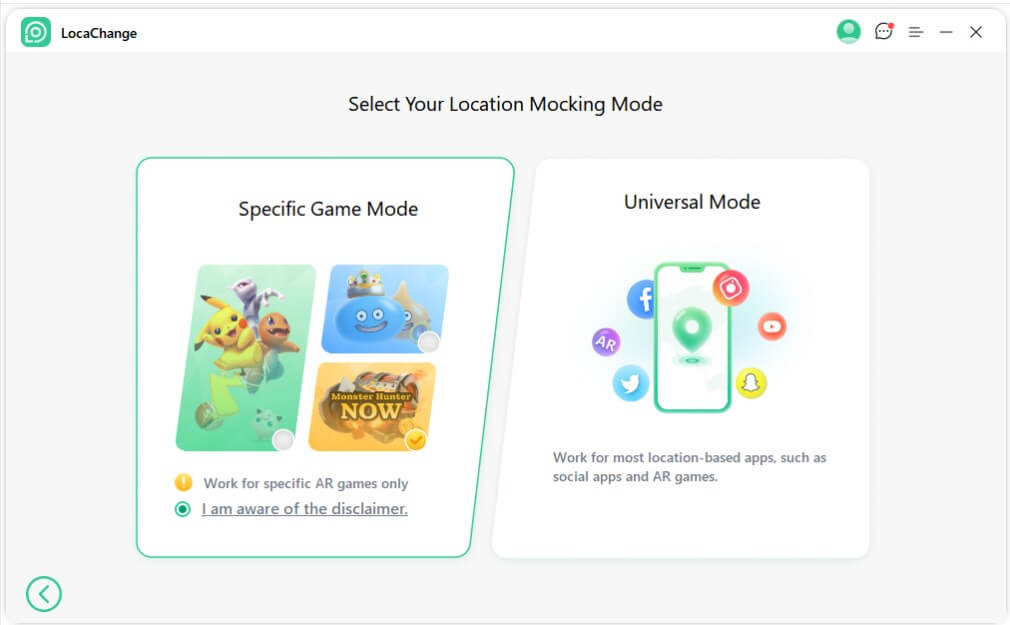
Step 2 Select Joystick Mode and start controlling your movement freely in Monster Hunter Now.
Joystick 2 Fake GPS Location - GPS JoyStick
Fake GPS Location - GPS JoyStick is a popular Android GPS spoofing app that many players use for Monster Hunter Now joystick movement. It allows you to set a fake location, move with a basic virtual joystick, and simulate walking inside the game.
This app is mainly designed for Android users and provides simple joystick controls for short-distance hunting or moving around specific areas. While it does not offer advanced automation like premium tools, it is still a workable option for players who want a free Monster Hunter Now spoofing method.
Key Features of GPS JoyStick
- Basic joystick mode for simple directional movement.
- Supports manual location selection anywhere on the map.
- Works on most Android devices without root.
- Offers custom walking speed settings.
How to Use the GPS JoyStick for Monster Hunter Now:
Step 1 Install Fake GPS Location - GPS JoyStick from Google Play.

Step 2 Enable the required permissions and set it as your mock location app in Developer Options.

Step 3 Open the joystick mode > select your target location > start Monster Hunter Now.
Step 4 Move around using the on-screen joystick.

Because MH Now has strict anti-spoofing detection, the app must be configured correctly. Many players report detection issues if mock location is not properly hidden, developer options are left visible, or apps detect "Allow Mock Location". For this reason, the safety level is considered medium, and it is recommended only for casual spoofing.
Joystick 3 iTools BT 2.5
iTools BT 2.5 is a hardware-based GPS joystick for iOS users who want to spoof in Monster Hunter Now. It works through a Bluetooth dongle and does not require jailbreak, making it safer than most software-only iOS spoofing methods.
Once connected, the dongle lets you control an on-screen joystick to move inside the game. Because it uses hardware-level GPS simulation, many players prefer it for long-term hunting or stable movement.
Key Features of iTools BT 2.5
- Works on iOS devices without jailbreak.
- Provides a physical joystick for more stable movement.
- Lower ban risk compared with apps that rely on "mock location".
- No need for PC - works directly with the dongle.
How to Use iTools BT 2.5 for Monster Hunter Now:
Step 1 Buy the iTools BT 2.5 dongle and charge it.

Step 2 Download the official iTools app on your iPhone.
Step 3 Pair the dongle via Bluetooth and allow location permissions.
Step 4 Select joystick mode > open Monster Hunter Now > move using the controller.


Although safer than root or mock-location apps, it is not 100% undetectable. Some players report occasional issues if movement speed is too high or teleporting is repeated too often.
Joystick 4 Root Joystick (LSPosed / Magisk)
Some Android players use root-based joystick methods such as Magisk + LSPosed + mock location modules. This setup allows deeper system control and can hide mock location better than standard apps, but it has higher risk and requires technical steps.
This method is mainly used by advanced users who already have a rooted phone and know how to manage modules.
Key Features of Root Joystick
- Full joystick control with high customization.
- Can hide mock location more effectively using LSPosed modules.
- Works on rooted Android devices only.
- Supports automation tools and complex movement paths.
How to Use Root Joystick for Monster Hunter Now:

Note: Exact steps vary by device and module, but the flow below matches common community setups and avoids misleading details.
Step 1 Root your Android device (usually with Magisk).

Step 2 Install LSPosed through Magisk.
Step 3 Install a compatible mock location / joystick module.
Step 4 Enable the module in LSPosed > configure hiding settings.
Step 5 Open your joystick app > choose location > start Monster Hunter Now.

Joystick 5 VMOS Virtual Joystick (Android Virtual System)
VMOS is an Android virtual machine app that creates a "phone inside your phone." Many players use it to run Monster Hunter Now together with a virtual GPS joystick inside the VM system.
Because it works in a separate virtual environment, it can sometimes avoid mock-location detection. However, performance depends heavily on device compatibility.
Key Features of VMOS Virtual Joystick
- Runs a virtual Android system on your phone.
- Allows installing a Virtual GPS / joystick app inside the VM.
- Works without root on many devices.
- Provides simple joystick controls for movement.
How to Use VMOS Virtual Joystick for Monster Hunter Now:
Step 1 Install VMOS from the official site or Google Play.

Step 2 Set up the VMOS virtual system and enable required permissions.
Step 3 Inside VMOS, install Monster Hunter Now and a Virtual GPS joystick app.
Step 4 Open the joystick > set your location > start MH Now inside the VM.
Step 5 Move using the virtual joystick on the VM screen.

[Video Guide] How to Use GPS Joystick for Monster Hunter Now?
If you are new to Monster Hunter Now spoofing or want to see how a GPS joystick works in real time, this video will help you. The guide shows the basic steps of setting up a joystick, choosing a location, and moving safely in the game without walking.
The video makes it easy to understand how joystick movement works on both iOS and Android. You can follow along even if you are a beginner.
Watch the full video below to learn how to start using a joystick in Monster Hunter Now and enjoy smoother hunting anywhere in the world.
FAQs About Monster Hunter Now Joystick
1. Can I use a Monster Hunter Now joystick for free?
Yes. The LocaChange Monster Hunter Now joystick offers a free trial. You can download the app, connect your iOS or Android device, and test the joystick features for a short period before upgrading.
2. Will I get banned for using a joystick in Monster Hunter Now?
There is always some risk when using any spoofing tool because Monster Hunter Now has anti-cheat detection.
To reduce the risk: avoid teleporting long distances, keep movement speed similar to normal walking, and use tools with anti-detection settings, such as cooldown reminders.
Tools cannot guarantee 100% safety, but using safer settings helps lower the chance of detection.
3. How can I avoid softban issues in Monster Hunter Now?
Account Reset: If you receive a soft ban, try uninstalling the game, reinstalling and logging into your account. This usually effectively removes the soft ban.
Use a Reliable Joystick: There have been reports of successful unblocking using certain safe Monster Hunter cheat methods. Always research reputable deception tools before trying them, and use them cautiously.
Cooldown Timer: If the previous methods don't work, consider waiting for the recommended cooldown. In order to ensure the safety of unblocking, some additional waiting time can be added.
4. What is the best GPS joystick for Monster Hunter Now?
LocaChange is one of the best options for Monster Hunter Now because it supports the latest iOS and Android versions, offers a 360° joystick, and includes anti-detection features designed to reduce softban risks.
5. Why is my Monster Hunter Now joystick not working?
If your Monster Hunter Now joystick is not working, it is usually caused by incorrect settings or missing permissions. Here are the most common reasons:
- Location permission is not set to "Allow All the Time."
- Developer Options are not configured correctly (Android).
- Your GPS is switching between real and fake coordinates.
- App not running in the foreground or system restrictions.
- Game cache or location stuck.
To solve the issue, check permissions, restart the game, reselect your joystick mode, or switch to a more stable spoofing tool like LocaChange, which offers a simpler setup on both iOS and Android.
6. Can I use a joystick for Monster Hunter Now on iOS 27?
Yes. You can use a Monster Hunter Now joystick on iOS 27. Tools like LocaChange support the latest iOS versions, including iOS 27 and upcoming future versions. Since LocaChange does not require jailbreak, you can safely use the joystick on iPhones and iPads updated to iOS 27.
Just install the LocaChange app, connect your device, and enable the joystick mode. It works the same way as on earlier iOS versions, offering smooth movement and real-time direction control.
Conclusion
The Monster Hunter Now joystick can help you freely change your virtual location anywhere, which will give you more hunting and gathering opportunities without leaving your home.
With the location changer LocaChange, you can enjoy a pwoerful Monster Hunter Now joystick with features like cooldown timers, favorite routes, and GPX support to further stimulate the excitement of the game.
Download the free version now to start your hunting journey, challenge monsters in various locations, and elevate your skills to new heights.


- Pokémon GO
- GPS Spoofing
- AR Gaming
- AR gaming and GPS spoofing specialist with over a decade of software experience. He is a trusted writer on Pokémon GO tips and safe location-changing strategies, helping over 2 million users worldwide. As an Apple enthusiast and expert in location-changing technology, he brings both technical depth and gaming insight to every guide.
 Related Articles
- [Safe & Simple] Monster Hunter Now Fake GPS Guide
- [2026] 3 Best Monster Hunter Now Cheats & Hack Guide
- Monster Hunter Now Special Skill Guide – Everything You Need to Know
- 9 Most Immersive GPS Games You Can’t Miss
- PGSharp Monster Hunter Now: Download, Use and Alternative
- Driftsmelt and Driftstone Monster Hunter Now Guide