


 Most Popular
 What's New
[2026] SpooferPro Review: Download, Use and Safety

SpooferPro Pokemon GO Substitute
Teleport in Pokemon GO with 1 click and use joystick movement on iOS and Android without installing a cracked Pokemon GO.
SpooferPro is one of the names iPhone Pokemon GO players keep running into when they search for a joystick, teleport, Pokemon GO mod. I understand why it gets attention: the official SpooferPro site still shows an active iOS product, a free plan, paid Pro and Elite plans, and a feature list built around Pokemon GO.
That does not mean every player should install it. SpooferPro uses an enhanced version of the Pokemon GO app or jailbreak-related tweaks, so the real question is not just "does SpooferPro work?" It is whether the setup, account risk, and iOS restrictions make sense for you.

Quick answer
What is SpooferPro? SpooferPro is an iOS Pokemon GO spoofer that adds fake location, joystick, teleport, IV preview, feeds, routes, and map features to Pokemon GO.
Is SpooferPro safe? I would not call any Pokemon GO spoofer completely safe. Niantic's policy names falsifying location and unauthorized third-party software as cheating, so SpooferPro can still create account risk.
Best fit: SpooferPro is mainly for iOS players who accept sideloading or jailbreak-style setup. If you want to keep the official Pokemon GO app, LocaChange is the cleaner route.
In this article:
What Is SpooferPro?
SpooferPro is an iOS GPS spoofer for Pokemon GO. Its official site describes it as an enhanced edition of Pokemon GO with joystick, teleport, IV previews, modified throws, auto walking, GPX routes, fast catch, live feed, and an in-app map.
As of the latest page checked for this update, SpooferPro lists version 0.391.1-0.586 with a Dec. 4, 2025 release date, which has been half a year ago. That tells me the project is not a dead legacy tool, but it is still an unofficial Pokemon GO setup rather than a normal App Store app.
| Question | Current Answer | What It Means for You |
|---|---|---|
| Platform | iOS-focused | Not the right pick if you need Spoofer Pro Android. |
| Official App Store app? | No | You deal with sideloading, certificates, or jailbreak-related setup. |
| Free plan? | Yes | Free users can try core spoofing features, while paid plans unlock more tools. |
| Account risk? | Still possible | Modified clients and fake GPS can violate Pokemon GO policy. |
Is SpooferPro Safe?

I would separate phone safety from account safety here. For your iPhone, the risk depends on where you download the file, how you sideload it, whether certificates get revoked, and whether you use jailbreak tweaks. For your Pokemon GO account, the bigger issue is Niantic's gameplay policy: falsifying GPS location and using unauthorized third-party software can lead to warnings, suspensions, or termination.
That does not mean every SpooferPro user gets punished. It means you should not treat it like a normal App Store utility. If you use it, use an account you can afford to lose, avoid extreme jumps, respect cooldowns, and do not trust random mirrors claiming to provide a special SpooferPro download.
SpooferPro Features, Pricing, and Limits
SpooferPro Features
- Fake location and teleport: Move to coordinates, Pokemon GO hotspots, or map locations.
- Joystick and speed control: Walk around without physically moving.
- IV previews: Check Pokemon strength before catching or from inventory views.
- GPX routes and auto walking: Build routes for farming, eggs, and PokeStops.
- Feeds and map tools: Find Pokemon, raids, quests, gyms, and PokeStops more quickly.

SpooferPro Pricing
| Plan | Price | Best For | Notes |
|---|---|---|---|
| Free | $0 | Trying basic spoofing features | Official site lists fake location, teleport, joystick, IV preview, routes, feed, and Virtual GO Plus features. |
| Pro | $5/month | Players who want more automation and faster play tools | Includes more features than the free plan. |
| Elite | $10/month | Heavy users who want the broadest feature set | Includes Pro features plus advanced automation-style tools. |
Limitations I would not ignore
SpooferPro is iOS-focused, not App Store based, certificate signing can break, and modified clients carry more policy risk than normal location tools.
How to Download SpooferPro Pokemon GO
The only download route I would consider is the official SpooferPro website. The current site says free users can download and sideload the IPA or install jailbreak tweaks. That is more accurate than the old claim that jailbreak is always required.
Method 1 Download SpooferPro iOS via Sideloadly
Step 1: Go to Sideloadly webstie and install the compatible version of your computer system.

Step 2: Download and install iTunes on your computer. You need iTunes to control your iPhone.

Step 3: Visit SpooferPro official site and get the IPA file.

Step 4: Connect your iPhone to the computer via a cable, then sideload the IPA file.

Step 5: Now use Sideloadly and iTunes to sideload the SpooferPro Pokemon GO app to your iPhone.


Note: This method does not need to jailbreak your iOS device, but in fact you are downloading the cracked Pokemon GO app to use SpooferPro, instead of the official game, which is risky.
Method 2 Download SpooferPro iOS via Dopamine
Step 1: Prepare a rootless jailbreak iPhone of iOS 15.5-iOS 16.6.1. Download the official Pokemon GO app from App Store.
Step 2: Go to SpooferPro website. Add the SpooferPro's Rootless Arm64 to Sileo/Zebra.

Step 3: Search for Ellekit in Sileo/Zebra and install.

Step 4: Install the SpooferPro Tweak from the repo.
Step 5: Tap on Pokemon GO to start playing.
Thoughts
If you are not already comfortable with sideloading, certificates, or jailbreak terminology, SpooferPro is probably more setup than you want.Best SpooferPro Alternative: LocaChange
If your goal is simply to change Pokemon GO location, hatch eggs with joystick movement, reach raids, or check active areas, I would look at LocaChange before a modified Pokemon GO. The biggest difference is that LocaChange works with the official Pokemon GO app, so you do not have to replace the game with a modified build.

 Key Features of LocaChange
- Works with the official Pokemon GO app instead of a modified Pokemon GO app.
- 1-Click teleport, joystick movement, route simulation, and GPX routes.
- Supports nearby Pokemon GO maps for Raids, Pokemon, PokeStops, Gyms, G-Max, D-Max, and Routes.
- Cooldown reminders and realistic movement settings help you avoid obvious location jumps.
- Compatible with the latest iOS 27 and Android 17 devices.

| Tool | Best For | Setup Difficulty | Verdict |
|---|---|---|---|
| SpooferPro | iOS players who want a feature-heavy hacked Pokemon GO experience | Medium | Powerful, but not the first tool I would suggest to cautious users. |
| LocaChange | Players who want teleport, joystick, routes, and official-app compatibility | Low | Better everyday choice for most iOS and Android users. |
| Random SpooferPro IPA mirrors | No one | Unclear | Avoid. You cannot verify what was changed in the file. |
How to Use LocaChange:
Step 1: Download and intall LocaChange.
Step 2: On LocaChange, choose the Special Game Mode and open Pokemon GO.

You can aslo to use LocaChange via PC to change location on iOS & Android:
Step 1: Connect your mobile phone to a PC.
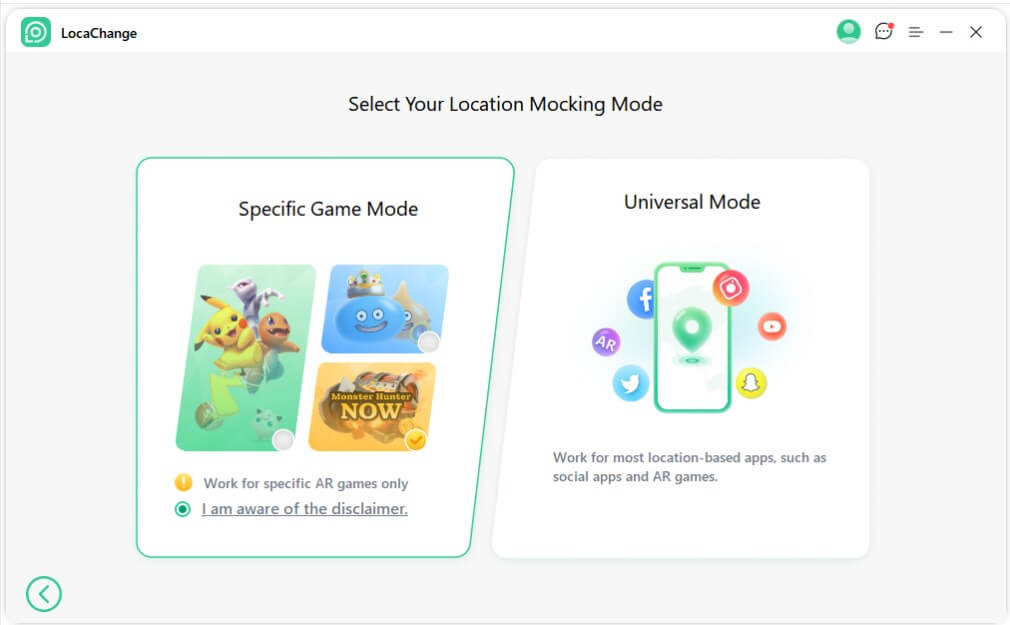
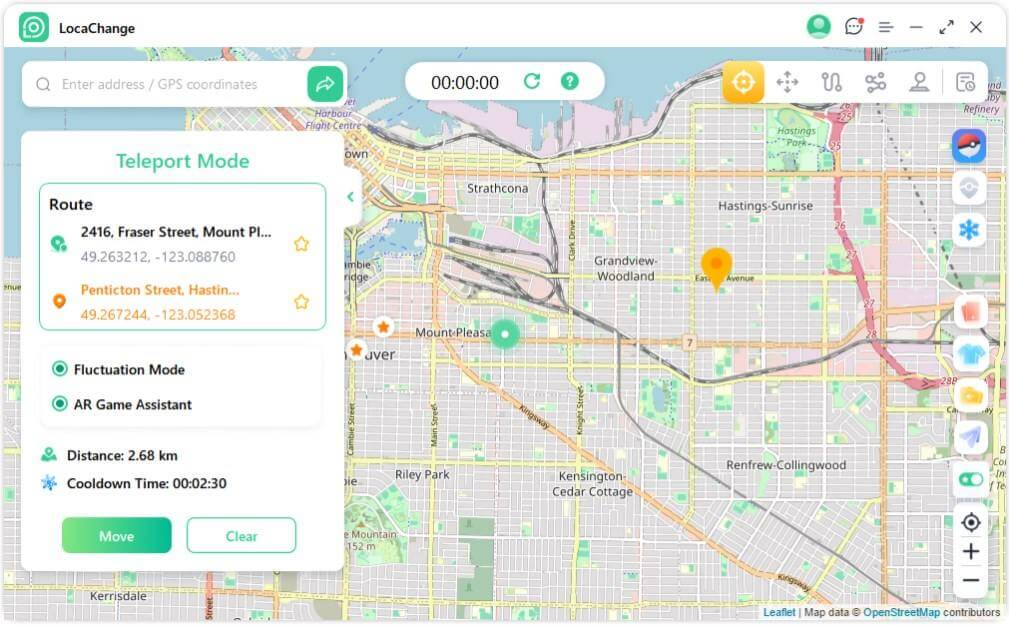
Step 2: Choose a mode you need and enter the location you want to change.
FAQs about SpooferPro
Is SpooferPro free?
Yes. SpooferPro lists a free plan, plus paid Pro and Elite plans.
Does SpooferPro work on Android?
No. SpooferPro is positioned as an iOS GPS spoofer.
Is SpooferPro available in the App Store?
No. SpooferPro is not a normal App Store download.
How many devices can use one SpooferPro key?
The official SpooferPro FAQ says one key can be used on up to 3 devices.
Can SpooferPro get a Pokemon GO account banned?
It can create that risk. Niantic's policy includes falsifying GPS location and unauthorized third-party software as cheating behaviors.
Conclusion
SpooferPro is still active enough to discuss seriously, and it offers a deep Pokemon GO feature set for iOS users. But it is not a simple, low-friction App Store app. If you want the modified-client experience and understand the risks, SpooferPro may be worth researching further. If you want a more practical way to change location while keeping the official Pokemon GO app, LocaChange is the option I would try first.


- Pokémon GO
- GPS Spoofing
- AR Gaming
- AR gaming and GPS spoofing specialist with over a decade of software experience. He is a trusted writer on Pokémon GO tips and safe location-changing strategies, helping over 2 million users worldwide. As an Apple enthusiast and expert in location-changing technology, he brings both technical depth and gaming insight to every guide.
 Related Articles
- [2026 New] iSpoofer Review: Safety, Download and Alternative
- [2026] iPogo Pokemon GO: Download, Use, and Alternative
- [2026] SpooferX Review: Download, Use and Alternative
- [2026] Spoofer Go Review: Download, Safety and Alternative
- Is Locachange Safe? LocaChange Review in 2026
- [2026] Best PGSharp Alternatives for iOS & Android