


 Most Popular
 What's New
PGSharp Monster Hunter Now: Download, Use and Alternative

PGSharp MH Now Alternative
The best alternative to PGSharp Monster Hunter Now. Change your in-game location with a 360-degree Monster Hunter Now joystick to anywhere with 1 click. 100% safe and no soft ban.

If you're a seasoned Monster Hunter Now player, you've probably heard of PGSharp Monster Hunter Now - a GPS spoofing tool that lets you hunt monsters, upgrade weapons, and explore distant areas without physically moving.
In this guide, we'll explain everything you need to know about PGSharp Monster Hunter Now, including how to download and use PGSharp safely. We'll also introduce the best PGSharp alternative - LocaChange, a safer and more stable GPS changer for both Android and iOS devices. Let's dive in!
In this article:
- What Is PGSharp Monster Hunter Now?
- Can You Use PGSharp to Play Monster Hunter Now?
- Features and Limitations of PGSharp for Monster Hunter Now
- How to Download PGSharp Monster Hunter Now?
- How to Use PGSharp in Monster Hunter Now?
- Best PGSharp Montsr Hunter Now Alternative - LocaChange
- FAQs About Monster Hunter Now PGSharp
What Is PGSharp Monster Hunter Now?
PGSharp Monster Hunter Now is a modified version of the game made for Android users to play Monster Hunter Now effortlessly. With this tool, you can create a virtual GPS signal that lets your in-game character move freely on the map without physically walking.
In other words, PGSharp for Monster Hunter Now allows you to hunt monsters, collect materials, and explore different areas right from your home. It's a convenient way to enjoy the game if you can't or don't want to go outside.
Can You Use PGSharp to Play Monster Hunter Now?
Technically, PGSharp does not officially support Monster Hunter Now at the moment. It is mainly designed for Pokemon GO, so some of its location spoofing features may not work properly with Monster Hunter Now. Players who try to use PGSharp Monster Hunter Now may face errors such as login issues, app crashes, or the game not detecting the spoofed location.
If you still want to spoof in Monster Hunter Now, it's better to try a secure and compatible alternative like LocaChange, which supports Monster Hunter Now directly and works without needing a modified version of the game.
Features and Limitations of PGSharp for Monster Hunter Now
1 Features of PGSharp for Monster Hunter Now
Use a 360-degree joystick to slay monsters in the game.
Easily teleport by entering accurate coordinates.
Supports import/export GPX files so that you can save routes.
Imitate a realistic footprint and set a customized route.
Play Monster Hunter Now Fake GPS anywhere and anytime.
Built-in Cooldown Timer lets you know how much time you have to wait.

2 Limitations of PGSharp for Monster Hunter Now
- Android Only: PGSharp Monster Hunter Now can only be used on the Android system and has years' limitations on iOS.
- Unavailable on Google Play: You must download it from the official PGSharp site since it's not listed on Google Play.
- Root requirement: Before using Monster Hunter Now PGSharp to change location, you may need to root your phone and enable mock location, which can be risky and complicated.
- Safety Concerns: Using PGSharp may cause temporary bans or harm your device's security.
- Unstable performance: The app can disconnect from servers or fail to load occasionally.

Since PGSharp Monster Hunter Now supports Android only, iOS users should try a safer and more stable alternative like LocaChange, which works smoothly across both Android and iOS without rooting or modding.
How to Download PGSharp Monster Hunter Now?
As mentioned earlier, PGSharp for Monster Hunter Now is not available on Google Play. So you'll need to manually download and install the PGSharp APK from its official website to ensure safety and stability.
Step 1: Go to the official PGSharp website. This is the only recommended and safe source to download the PGSharp Monster Hunter Now APK.
Step 2: On the homepage, tap "Download". Wait until the APK file finishes downloading.

Step 3: Open your phone's Settings > Security > Install unknown apps, then allow installation from your browser (if prompted).
Step 4: Locate the downloaded PGSharp APK in your file manager and tap Install. Follow the on-screen instructions until the setup completes.
Step 5: Once installed, open the PGSharp app, grant all required permissions, and complete the initial configuration. Then launch Monster Hunter Now to start spoofing your GPS safely.
 Note
Note
Since PGSharp was not designed for Monster Hunter Now, we recommend that you choose other apps that officially support "Monster Hunter Now". Otherwise, your account may be banned.
How to Use PGSharp in Monster Hunter Now?
After successfully installing the PGSharp Monster Hunter Now APK, you can try to use it to play your MH Now game. Although PGSharp offers abundant features, these are mainly designed for Pokemon GO. You can use the basic features, such as joystick and location spoofing, for Monster Hunter Now.

Move With the Joystick: Use the on-screen joystick to control your in-game movement. You can explore new areas, find monsters, and collect materials without physically walking.
Teleport to a New Location: Tap the map icon or input coordinates to instantly teleport to another location in the world. This is useful for joining special hunts or accessing rare monster zones.
Adjust Movement Speed and Settings: PGSharp allows you to customize your walking speed, switch between routes, or simulate realistic movement paths. Adjust these settings according to your preference to make your spoofing appear natural.
Follow Cooldown Rules: To avoid getting soft-banned in Monster Hunter Now, always follow PGSharp's built-in cooldown timer. Wait for the recommended cooldown time before teleporting to a new spot again.
Best PGSharp Montsr Hunter Now Alternative - LocaChange
If you're looking for a safer and more powerful PGSharp Monster Hunter Now alternative, LocaChange is your best choice. Just like PGSharp, it's a reliable location spoofer for Pokemon GO, but it goes even further. LocaChange includes every feature PGSharp offers - and adds more advanced tools that PGSharp doesn't have.
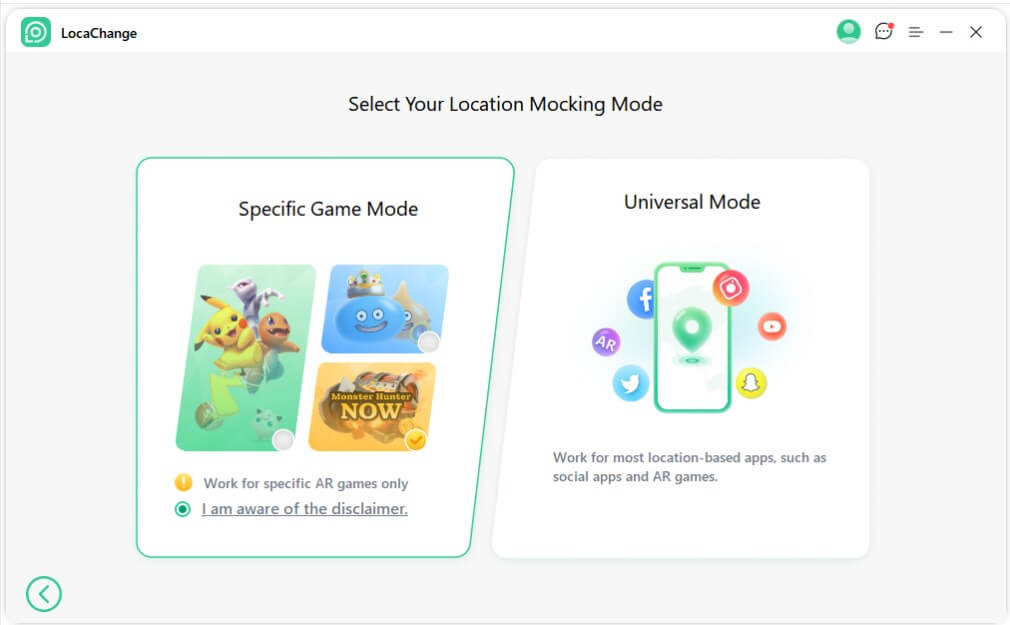
No matter whether you're using iOS or Android, you can use LocaChange to change your Monster Hunter Now location with just one tap. It even provides a Special Game Mode designed specifically for Monster Hunter Now spoofing, helping players fake GPS safely and smoothly.

 Key Features of LocaChange
- 1-click to change location in Monster Hunter Now. No need to download PGSharp MH Now.
- Working on iOS and Android systems, supproting working on up to 10 different devices simultaneously.
- Special Game Mode enhances your hunting experience with cool-down timers and adjustable movement speed to reduce the risk of a soft-ban.
- It boasts strong compatibility and can modify location on AR games and social apps, including MH Now, Pokemon GO, Soundmap, Life360, Tinder, and more.
- Over 1,000,000 users worldwide with positive feedback.
- Free trial available, so you can test it before purchase.
How to Use LocaChange as a PGSharp Alternative for Monster Hunter Now
Step 1: Download and install LocaChange.
Step 2: Open LocaChange app, choose the Specific Game Mode and choose Monster Hunter Now. Enjoy your game!
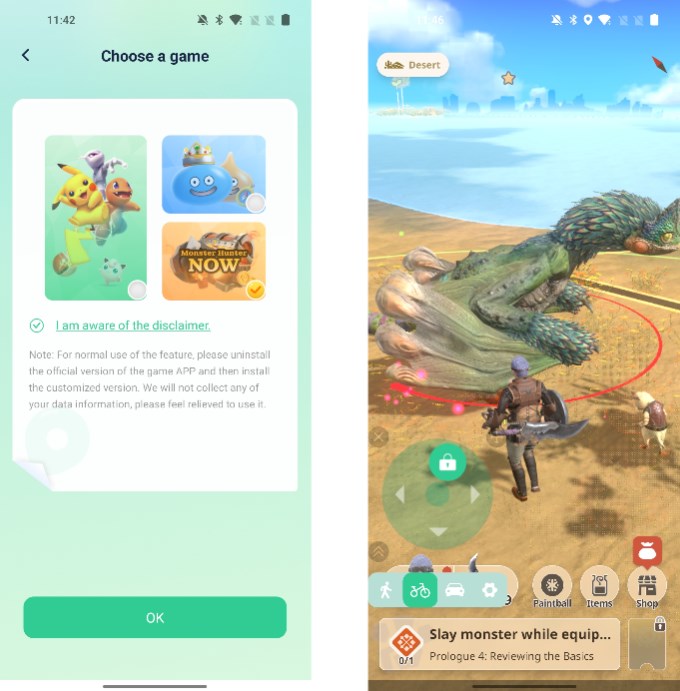
Also, you can change Monster Hunter Now location for iOS/Android devices on PC with 1-click:
Step 1: Open LocaChange on PC and choose the Game Mode.
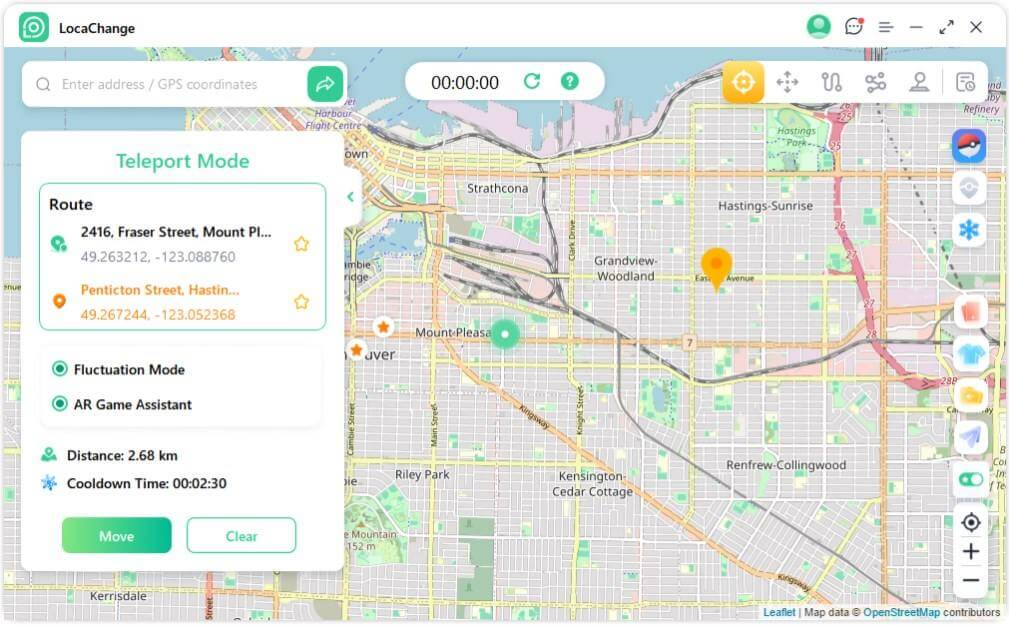
Step 2: Select the Teleport Mode and choose the location or coordinate you want to change in MH Now.
FAQs About Monster Hunter Now PGSharp
1. How to Use PGSharp for Monster Hunter Now?
To use PGSharp Monster Hunter Now, download the PGSharp APK file online first, then install it on your Android device. When ready, choose the spoofing mode and change your location in MH Now to battle monsters.
2. Can I Use PGSharp Monster Hunter Now on iOS?
No, PGSharp only supports Android systems and is not workable on iOS. So if you want to modify your GPS location in Monster Hunter Now, you need to use other alternative tools, among which LocaChange is an outstanding one.
3. Is PGSharp MH Now Safe to Use?
As Niantic strengthens its detection towards spoofing and cheats, PGSharp is not safe for Monster Hunter Now. Players using PGSharp in the game meet the problem of "Searching for GPS Signal" from time to time. That is because the spoofing behavior is detected by the game system.
Conclusion
PGSharp Monster Hunter Now brings convenience and excitement to players who want to explore new areas and hunt monsters without moving.
However, it also comes with several drawbacks - limited device compatibility, safety risks, and unstable performance on Android.
If you're searching for a safe and all-in-one PGSharp Monster Hunter Now alternative, location changer LocaChange is the best option. It supports both iOS and Android, offers 1-click teleportation, Special Game Mode, and anti-ban features that make spoofing smoother and safer.
Try LocaChange today and experience a smarter way to play Monster Hunter Now without limits!


- Pokémon GO
- GPS Spoofing
- AR Gaming
- AR gaming and GPS spoofing specialist with over a decade of software experience. He is a trusted writer on Pokémon GO tips and safe location-changing strategies, helping over 2 million users worldwide. As an Apple enthusiast and expert in location-changing technology, he brings both technical depth and gaming insight to every guide.
 Related Articles